Passkeys are slowly replacing password but do you know what they are? For years, we’ve heard security advice telling us to create longer, more complex passwords, avoid reusing them, and rotate them regularly. Yet despite all the advice, passwords remain one of the weakest points in digital security. Without the proper precautions, they can be easy to steal, easy to guess, and easy to mis-use. Even with password managers and two‑factor authentication, the humble password continues to cause headaches.
Passkeys aim to change that. They’re designed to replace passwords entirely with a more secure, more user‑friendly system based on cryptographic keys rather than shared secrets. Apple, Google, Microsoft, and many major online services now support passkeys; thus, momentum is building fast.
But like any new technology, passkeys come with both advantages and limitations. Here’s a clear breakdown of what they are, why they’re considered a major upgrade, and where the current pitfalls lie.
What Exactly Are Passkeys?
A passkey is a passwordless login method built on public‑key cryptography. Instead of typing a password, you authenticate using something like Face ID, Touch ID, Windows Hello, or a device PIN.
Each passkey is made up of two parts:
- A public key, stored on the website or service.
- A private key, stored securely on your device or in your encrypted cloud keychain.
When you log in, the service sends a challenge that only your private key can answer. The private key remains on your device, and you never provide any text that attackers could intercept or misuse.
Passkeys are part of the FIDO2 and WebAuthn standards, which are designed to eliminate passwords entirely and make phishing attacks effectively impossible.
Why Passkeys Are Better Than Passwords
1. They’re Far More Secure

Passwords can be:
- Guessed
- Reused
- Stolen in data breaches
- Phished
- Brute‑forced
Passkeys eliminate all of these weaknesses.
Because the private key never leaves your device, there’s nothing for attackers to intercept. Even if a company suffers a data breach, the attacker only gets the public key, which is useless on its own.
Passkeys also cannot be phished. They only work on the legitimate domain they were created for, as a result, fake login pages simply fail.
2. They’re Much Easier to Use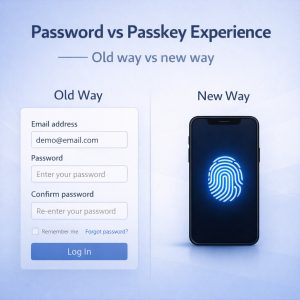
Passkeys remove the cognitive load of remembering dozens of passwords.
- No more password resets
- No more complexity rules
- No more password managers (unless you want one for convenience)
- Logging in becomes as simple as unlocking your device
For most people, this is a huge quality‑of‑life improvement.
3. They Stop Scalable Attacks
Password attacks scale easily. One breach can expose millions of credentials that attackers can reuse elsewhere.
Passkeys break this model entirely:
- Each passkey is unique to one site
- Attackers need physical access to your device
- They also need to pass your biometric or PIN check
This makes mass credential‑stuffing attacks obsolete.
4. They Sync Across Devices
Modern passkeys can sync through secure cloud keychains such as:
- iCloud Keychain
- Google Password Manager
- Microsoft Authenticator
This means you can sign in on your laptop using a passkey stored on your phone, or vice versa.
The Pitfalls and Limitations of Passkeys
Passkeys are a major improvement, but they’re not perfect. Here are the current challenges.
1. Not Every Website Supports Them Yet
Although adoption is growing, many sites still rely on traditional passwords.
This means users end up juggling both systems for now. Until passkeys become universal, passwords won’t disappear completely.
2. Device Loss and Recovery Can Be Confusing
Because passkeys are tied to your device or cloud ecosystem, recovery can be tricky:
- Lose your device? You need access to your cloud backup.
- Switch ecosystems? Moving passkeys may require extra steps.
- Use multiple platforms? Syncing varies depending on the service.
Consequently, for less technical users, this can be a stumbling block.
3. Cloud Sync Raises Questions
Passkeys stored in cloud keychains are encrypted, but some users still worry about:
- What happens if a cloud provider is compromised?
- How exactly are synced keys protected?
The risks are low, but the concerns are understandable.
4. Ecosystem Lock‑In Is a Real Issue
Because passkeys rely on platform‑level support, users may feel tied to a specific ecosystem.
Cross‑platform compatibility is improving, but it’s not perfect. Enterprises, in particular, may face compatibility gaps.
5. Biometric Concerns
Passkeys often rely on biometrics for convenience. While biometric data never leaves your device, some users remain wary.
The technology is secure, but perception matters.
6. There’s a Learning Curve
For people who have spent decades using passwords, the idea of cryptographic keys can feel abstract.
Users may not understand:
- How passkeys work
- How to recover them
- Why they’re safer
Education will be key to widespread adoption.
Are Passkeys the Future?
Most security experts believe so. Passkeys offer:
- Stronger security
- Better user experience
- Resistance to phishing
- Protection against large‑scale breaches
- A modern, open standard supported by major tech companies
But the transition will take time. Until passkey support is universal and users feel comfortable with them, organisations will keep relying on passwords as well.
Still, the direction is clear: the industry is moving toward passkeys as the new default for secure, user‑friendly authentication.
Final Thoughts
Passkeys represent one of the biggest shifts in online security in decades. By replacing shared secrets with cryptographic identity, they solve many of the problems that have plagued passwords since the early days of the internet.
Passkeys are more secure, easier to use, and far more resistant to modern attacks. But they’re not without challenges—adoption gaps, device dependency, and ecosystem fragmentation all need time to mature.
For the time being, because of the hurdles mentioned above, passkeys and passwords will live side by side. But the writing is on the wall: the password’s long reign is finally coming to an end.
For more great security tips and advice, check out our Index Page