Sorting Lists Alphabetically
Sometimes it can be useful to have your list in alphabetical order – maybe you have a list of names, places, etc. but you haven’t entered them in alphabetical order.
No problem, Microsoft have thought of this, and Word makes it very easy to sort your list, and automatically re-number it if necessary.
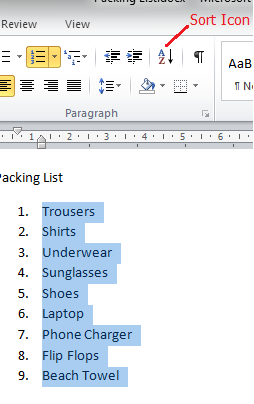
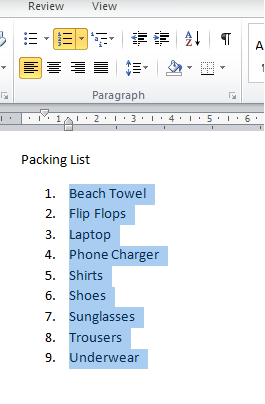
In the screenshot on the left below you will see that we have made a numbered list but it’s in no particular order, so we will sort it alphabetically.
- Activate the Home tab on the ribbon.
- Highlight the parts of the list you wish to sort.
- Click Sort on the ribbon.
- Specify your sorting criteria in the dialog box, and click OK to sort the list as shown on the right
Top Tip
This feature only works when the list is continuous, if you have other text or graphics within your list the sort will not work correctly – temporarily remove them, and put them back in when the sort is completed.